Discount Tire
Reinalt-Thomas CorporationAuto & Vehicles
3.4497.00 Reviews
- Version
- 3.10.7
- Installs
- 500.00K
- Age Rating
- Everyone
Screenshots

Our Review of Discount Tire
 Analysis by Appyee
When a tire problem appears at the wrong moment, the difficult part is often not knowing that the tire needs attention. It is turning that concern into a practical next step: finding a suitable tire, checking wheel choices, arranging service, and keeping track of what happens afterward. I found Discount Tire most useful as a starting point for that process rather than as a complete replacement for every part of tire ownership.
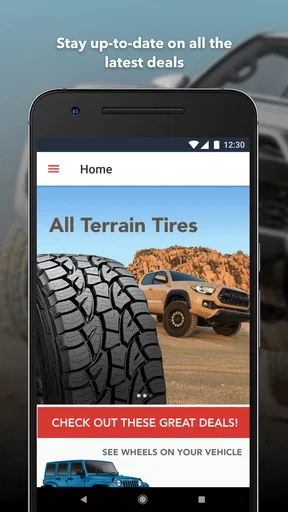
This free Auto & Vehicles app comes from Reinalt-Thomas Corporation and is aimed at people who want to browse the company’s tire and wheel selection from a phone. Its appeal is straightforward: instead of beginning with a general web search or walking into a store without preparation, I can use a focused tool built around tires, wheels, and the service journey connected to them. That focus makes it especially practical when I already know my vehicle or have a clear problem to solve.
At the same time, I would not describe it as a universal automotive companion. It is not the app I would open for fuel prices, repair diagnostics, roadside assistance, or broad vehicle maintenance advice. Its job is narrower, and the experience is better when I treat it that way. With an average rating of 3.4 from roughly 1.1 thousand ratings, it has a mixed reception, which matches my impression: the core shopping purpose is useful, but the quality of the overall experience depends heavily on how simple or complicated the tire decision becomes.
From a tire concern to a workable service plan
I use this section to move from the first sign of trouble toward a clear, manageable plan, without treating a shopping choice as a diagnosis. A little preparation—especially noting the vehicle details and the symptom—can make the next conversation more useful. From there, I’ll look at how the app handles the practical steps that follow.
Starting with the problem, not the product list
The best way to use Discount Tire is to begin with a real-world condition. Maybe I notice a slow leak before a commute, see uneven wear during a routine check, hear a vibration at highway speed, or realize that seasonal driving has exposed the limits of an old set. In each case, I need more than a large catalog. I need a path from the vehicle in front of me to a sensible choice.
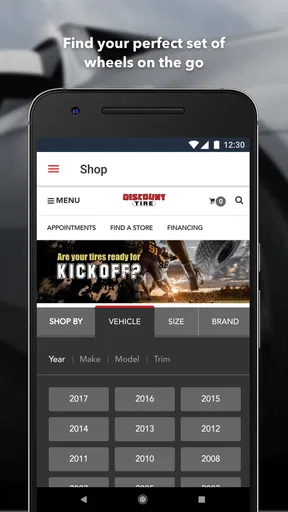
I would first gather the information already available to me. The vehicle’s make, model, year, and trim can matter, but so can the tire size printed on the sidewall or shown on the vehicle placard. That small preparation makes the app more useful because it reduces the chance of browsing options that are attractive but unsuitable. It also helps when another person has to take over the process later, such as a family member arranging the appointment or a technician confirming the fitment.
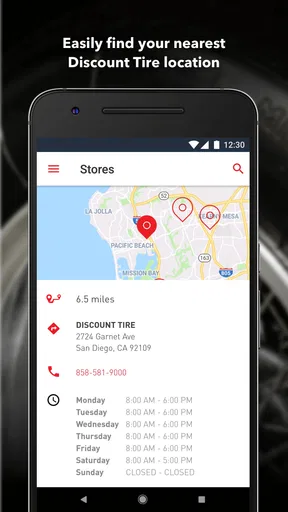
This is one of the app’s practical strengths: it gives the shopping task a defined destination. Rather than searching the entire internet for a tire and then separately trying to find a nearby retailer, I can keep the product decision and the store-related next step connected. That does not remove the need to check the details carefully, but it reduces the number of disconnected tabs and notes I would otherwise manage.
Moving from vehicle details to tire choices
Once I have identified the vehicle or size, I would compare options according to the way I actually drive. A commuter who spends most of the week on dry city roads may value a different balance from someone who regularly travels in heavy rain, carries equipment, or drives long highway distances. The cheapest-looking option is not automatically the best value if it changes road noise, ride comfort, wet traction, or expected replacement timing in ways that matter to me.
The app’s tire-and-wheel focus is helpful here because it keeps the decision grounded in the hardware rather than turning it into a general discussion about cars. I can use it to narrow the shopping conversation before speaking with a store. That is particularly useful for someone who feels uncomfortable walking into a tire retailer with no idea what questions to ask.
My advice is to treat the displayed selection as a shortlist, not as an instruction to buy immediately. I would compare the tire’s intended use with the vehicle manual and the information on the car itself. If the app presents several plausible choices, I would write down the exact model and size I am considering, then confirm that the choice matches the vehicle’s requirements. This extra step is not glamorous, but it protects against a common mistake: choosing based on a familiar brand name or attractive appearance while overlooking the specification that actually matters.
Using wheels as a separate decision
Wheel shopping deserves a different mindset from tire replacement. A tire is usually connected to worn tread, damage, age, or changing driving needs. Wheels may be about appearance, a replacement for damage, a second setup, or a practical seasonal arrangement. Discount Tire is more useful when I keep those purposes separate instead of treating every wheel shown as an upgrade.
For a replacement wheel, fitment is the first concern. For a style change, I would also think about cleaning, curb damage, ride comfort, and whether the visual change is worth the added expense. A wheel that looks good on a screen may not suit the vehicle once viewed in person, and a package that seems simple can create extra decisions about tire sizing. The app can begin that conversation, but I would still want a careful confirmation before committing.
A useful workflow is to save or note two alternatives: the practical choice that meets the vehicle’s needs and the appearance-focused choice that I would select only if the fitment and budget remain sensible. That makes the eventual handoff easier. I can tell the store what I prefer without losing sight of what the vehicle actually requires.
Turning browsing into an appointment or store conversation
The important transition is the handoff from my phone to the people and processes at the retail location. Before I leave the app, I would make a short checklist containing the vehicle, the tire or wheel option, the reason for the visit, and any symptom I noticed. “Slow leak on the rear passenger side” is more useful than simply saying “I need tires.” “Vibration after highway driving” gives the technician a starting point, even though it does not prove the cause.
This preparation matters because tire service is not only a product transaction. The store may need to confirm the fitment, inspect the existing setup, and discuss what can realistically be done. If I arrive with only a screenshot or a vague memory of the product name, I create unnecessary back-and-forth. If I arrive with the exact choice and the reason behind it, the conversation can move faster.
I would also avoid assuming that seeing an item in the app means the entire job is already arranged. A product selection and a completed service visit are different stages. The app helps me organize the first stage, while the store handles the physical inspection and installation process. Keeping that distinction in mind prevents disappointment when the final recommendation changes after someone examines the vehicle.
A realistic everyday scenario
Imagine I discover a tire that is losing air before a morning trip. I would not begin by scrolling through every tire category. I would photograph or record the sidewall information, identify the vehicle in the app, and narrow the choices to tires appropriate for the car. Then I would compare the options based on the trip: mostly highway, possible rain, and a need for predictable handling rather than a cosmetic change.
Next, I would note the selected tire and contact or visit the relevant Discount Tire location through the normal service process. At the handoff, I would explain the slow leak and ask for the tire to be inspected rather than assuming replacement is the only answer. If the tire is repairable, the best outcome may be different from the purchase I initially imagined. If replacement is necessary, the earlier research means I can understand the recommendation and make a decision without starting from zero.
The outcome in this scenario is not simply “I found a tire.” It is a cleaner chain of decisions: symptom, vehicle information, shortlist, technician discussion, and a service result. That chain is where the app earns its place. It reduces uncertainty before the physical part of the job begins, even though it cannot perform the inspection itself.
What the app does well in this workflow
For me, the strongest benefit is concentration. Discount Tire does not make me sift through unrelated automotive content before reaching tires and wheels. That makes it easier to use during a time-sensitive situation, provided I already know enough about the vehicle to search responsibly.
Another strength is preparation. A first-time tire buyer can use the app to become familiar with the available choices before speaking with a salesperson. That changes the tone of the store visit. I can ask why one option suits my driving better than another, instead of accepting the first phrase that sounds convincing.
The app is also useful for household coordination. If one person owns the car and another person handles the appointment, both can work from the same product choice and vehicle information. This is a small benefit, but it prevents the classic problem of someone arriving at a store with an incomplete description and having to repeat the entire research process.
Its popularity is substantial, with more than 500 thousand installs, so it is not an obscure experiment that only a few drivers have tried. Still, popularity should not be confused with a perfect experience. The rating suggests that some users encounter friction, and I would keep expectations realistic when moving between browsing, account or store steps, and the final service interaction.
Where the handoff can become frustrating
The weakest point in this kind of workflow is the boundary between digital selection and physical service. A phone can show a tire or wheel choice, but it cannot judge every condition affecting the vehicle. Existing damage, unusual wear, a mismatch between the current setup and the intended replacement, or a symptom caused by suspension or alignment can all change the correct next step.
That means I would not use the app to diagnose a vibration, pull, noise, or repeated pressure loss by myself. I would use it to prepare the discussion. If the problem is safety-critical, the physical inspection takes priority over continuing to browse. This is an important trade-off: the app can make me more organized, but it should not make me overconfident.
There can also be friction when my preferred product is not the most sensible answer for the vehicle or driving conditions. A visual wheel choice may need a different tire size. A performance-oriented tire may be unnecessary for a low-mileage city car. A bargain choice may not suit someone who drives long distances in difficult weather. In those moments, the app is a useful menu, but the final decision needs context that a product screen cannot fully provide.
I would skip the app if I want broad, brand-neutral research across many retailers, detailed independent testing, or a complete maintenance history for my vehicle. A general search engine, an automotive forum, a manufacturer guide, or a dedicated vehicle-maintenance app may be better for those tasks. I would also skip relying on it alone if I am trying to solve a mechanical fault rather than arrange tire or wheel service.
Practical habits that improve the experience
- Record the sidewall information before browsing. This reduces the risk of selecting a visually appealing but incorrect size and gives the store a reliable starting point.
- Separate replacement from customization. If the tire is damaged, solve the safety and fitment problem first; consider wheel appearance as a second decision.
- Bring the symptom into the handoff. A leak, vibration, uneven wear pattern, or handling change can be more important than the product you initially selected.
- Keep a backup choice. Having a second suitable option makes the conversation easier if the first choice does not fit the vehicle or the driving conditions.
- Use the app before the visit, not instead of the visit. The most reliable workflow combines digital preparation with an in-person inspection when service is required.
Who will get the most from it
I think Discount Tire is a good match for drivers who already know they need tires or wheels and want a focused way to prepare. It is especially approachable for someone buying tires for the first time, someone comparing choices before visiting a retailer, or a household that wants to coordinate a purchase without exchanging a long chain of messages.
It also suits drivers who prefer a guided retailer experience over building a purchase entirely from independent sellers. The app keeps the shopping journey connected to the company behind the service, which can feel more manageable than buying a tire from one place and arranging installation somewhere else.
On the other hand, experienced enthusiasts who want deep technical comparisons may find it too narrow. They may prefer specialist tire databases, manufacturer specifications, professional reviews, or local shops where they can discuss unusual fitments in detail. Likewise, drivers who only need emergency help on the roadside should look for a service designed specifically for that situation rather than opening a tire-shopping app.
Compatibility, cost, and day-to-day usability
The app is free and carries an Everyone content rating, so it is easy to recommend as a low-risk tool for ordinary vehicle owners. It was released on October 2, 2018, and the current version is 3.10.7, with Android support beginning at version 8.0. Those details make it accessible to many Android users, although anyone with an older device should check compatibility before planning around it.
Because there is no purchase price for the app itself, the real financial decision begins with the tires, wheels, and service choices shown through the shopping process. I would not let the free download encourage rushed spending. The useful question is whether the selected product is appropriate for the vehicle and the way I drive, not whether opening the app cost anything.
In everyday use, I would keep it installed only if I expect to manage tire purchases or service through Discount Tire. If I replace tires rarely and already have a trusted local process, a web browser may be enough. The app becomes more worthwhile when I need to research several options, prepare another driver for a visit, or return to the same retailer-related workflow more than once.
My final assessment after following the complete journey
After looking at the experience from the initial problem through the store handoff and the eventual service decision, I see Discount Tire as a practical preparation tool with a clear boundary. It is strongest before the vehicle enters the shop: identifying a starting point, organizing tire and wheel choices, and helping me ask better questions. It is less dependable as a standalone answer to mechanical symptoms or unusual fitment decisions.
The developer, Reinalt-Thomas Corporation, has built the app around a focused retail purpose rather than trying to cover every automotive need. That focus is both its advantage and its limitation. I appreciate not being distracted by unrelated features, but I also have to switch to another source when I need independent comparisons, technical diagnosis, or broader maintenance guidance.
My recommendation is to use it as the first half of a tire-service workflow, not as the whole workflow. Start with the vehicle information, narrow the choices carefully, record the reason for the visit, and let the physical inspection decide whether the original plan still makes sense. If that matches what you need, the free app can save time and make a stressful purchase feel more organized. If you want a complete automotive toolkit or a fully independent research platform, another option will serve you better.
Privacy and Permissions
See what permissions an app requests and how it handles your data.
- Identity
- find accounts on the device
- Contacts
- find accounts on the device
- Location
- approximate location (network-based), precise location (GPS and network-based)
- Wi-Fi connection information
- view Wi-Fi connections
- Other
- view network connections, pair with Bluetooth devices, full network access, run at startup, prevent device from sleeping
Verdict
Strengths of Discount Tire
- Easy access to tire services, appointments, and store information.
- Useful tire search tools help match products to your vehicle.
- Service reminders can help users keep up with tire maintenance.
- Store locator makes it easier to find nearby Discount Tire locations.
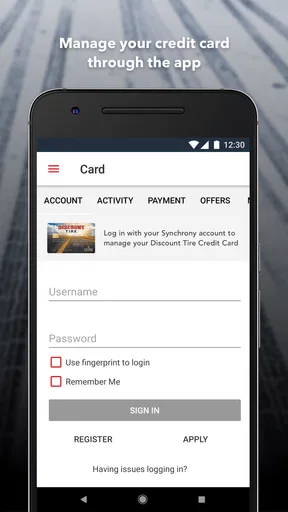
- Mobile access to account and purchase information is convenient.
Limitations of Discount Tire
- Some features may require an existing Discount Tire account.
- Appointment availability depends on the selected store and service.
- Product prices and inventory can vary by location.
- The app may offer limited value outside Discount Tire service areas.
- Some users may prefer browsing tire options on a larger screen.
Similar Picks in This Category
View All
Android Auto
Google LLC4.1

maxim — order a taxi & food
PT. SITO4.7

Штрафы ГИБДД: проверка с фото
Pays LLC – Штрафы ГИБДД4.7

Номерограм – проверка авто
Авто Ассист4.8

Дром Авто
Дром4.9

Frequently Asked Questions
What is the Discount Tire app used for?
The Discount Tire app is designed to make tire shopping and vehicle maintenance more convenient. From the app, users can browse available tires, compare products, check prices, locate nearby Discount Tire stores, and request service appointments. Depending on location and account availability, it may also help you manage purchases, view order information, and keep track of upcoming tire-related needs.
Can I buy tires through the Discount Tire app?
Yes, the app generally allows users to search for tires based on vehicle information, tire size, brand, performance category, and budget. Product pages typically include specifications, pricing, and availability details. Before purchasing, it is important to confirm that the selected tire matches your vehicle and driving requirements, since inventory, installation options, delivery, and final pricing can vary by store and region.
Can I schedule tire installation or other services in the app?
In supported locations, Discount Tire customers can use the app to find a nearby store and request or manage service appointments. Available services may include tire installation, rotation, balancing, inspections, and other tire-related assistance. Appointment availability depends on the selected store and service type, so the app should be treated as a convenient scheduling tool rather than a guarantee of immediate service.
Do I need an account to use the Discount Tire app?
Some features may be available without signing in, such as browsing tires, checking general product information, or locating stores. However, an account may be required for more personalized functions, including viewing orders, managing appointments, saving vehicle details, or accessing purchase-related information. Creating an account can make repeat visits easier, although the exact requirements may differ according to the app version and your location.
Is the Discount Tire app free to download and use?
The Discount Tire app is generally free to download from the official Android or iOS app store. You do not normally pay a separate fee simply for installing or browsing the application, but purchases, tire installation, maintenance services, and other products are charged separately. Mobile data charges may also apply, and prices, promotions, taxes, and service fees can vary by location.
